Decision forest
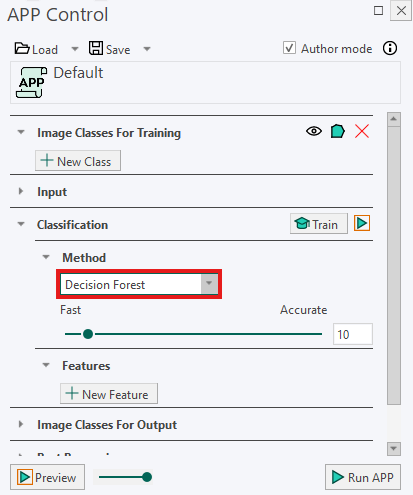
A Decision Forest classifier assigns pixels or objects to classes by combining the results of multiple decision trees. Each decision tree makes a classification based on the training labels and the measured image features, such as staining intensity, color, or texture. The forest combines these individual decisions to select the most likely class.
The classifier can be adjusted using the slider between Fast and Accurate. Slider values range from 1 to 100:
- Lower values create a simpler classifier that trains and runs faster.
- Higher values create a more detailed classifier that may improve classification results but requires more processing time.
It is often not necessary to use the highest setting to achieve satisfactory results. Start with a moderate value and move the slider toward Accurate if the classification does not sufficiently separate the relevant tissue types or structures.
The slider automatically adjusts two underlying parameters:
Number of trees
A Decision Forest consists of multiple decision trees. Each tree provides an individual classification, and the forest combines their results to determine the final class.
Increasing the slider value increases the number of trees. Using more trees can make the classification more stable by reducing the influence of any single tree. However, it also increases the time required to train and run the classifier.
The number of trees is calculated as follows:
Number of Trees = Slider value
Maximum depth
The maximum depth specifies how many levels of decisions each tree can use before returning the most likely class. A tree with a greater maximum depth can evaluate more detailed combinations of image features.
Increasing the slider value increases the maximum depth. This allows the classifier to create more detailed distinctions between classes, but it also increases processing time and may make the classifier more sensitive to the provided training labels.
The maximum depth is calculated as follows:
Max Depth = (Slider value / 100) × 20
Recommendations
For best results, make the training labels for the different classes approximately the same size. This helps prevent classes with larger training areas from having too much influence on the classifier.
Make sure the training labels represent the variation found in the image. For example, include labels from areas with different staining intensities or tissue appearances when these variations should belong to the same class.
If many individual pixels are classified differently from their surrounding pixels, try moving the slider toward Accurate. This gives the classifier more trees and greater depth, which may produce a more stable result. If the classifier is already producing satisfactory results, a lower setting can reduce processing time.